Johnny Sokko and his flying robot torrent http://multiupload.com/JVG9NKSJY8
i have only 512kbps upload speed but will seed 24x7
Johnny Sokko and his flying robot torrent http://multiupload.com/JVG9NKSJY8
i have only 512kbps upload speed but will seed 24x7
http://www.box.net/shared/q0coyxd3uv
I did not noticed any major change in functioning of modem / router, only some graphical interface and viewing changes. Some menu and configuration settings changed now & can be easily accessed. After upgrade you will find all settings and configurations by typing http://192.168.1.1 hence http://192.168.1.1/home1.html dose not required any more as earlier.


I even tried it on Nokia Siemens Networks's C2110. Firmware of Nokia Siemens C2110 now changed and it is showing ZXDSL 831AII as modem. Though firmware worked on C2110 and my modem is working fine, it is not advisable to do upgrade on nokia siemens C2110 at all.


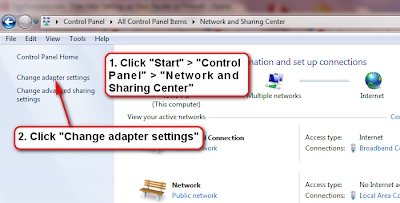

Then we can find TCP/IP Protocol v4 and there we can set our static fix LAN IP address / Subnet Mask / Gateway / DNS Server
 2. And log in using username: admin / password: admin then click "OK"


5. On next Screen Click on 'Port Forwarding"

7. On next screen in Application Name, Pre-defined: can be selected to forward standard port of a program from like GNUtella / KazAa / FTP clients / many Games etc
Just select Application Type -> Select Application -> Enter Internal Host IP Address in "Forward to Internal Host IP Address:" (IP address configured in OS to connect MODEM / ROUTER, In this CASE 192.168.1.2 )
Then press "Apply"

8. If any other application's port is to be forwarded, First Select "User defined:"
9. Select "WAN Interface:" (This is PPPOE connection of our ISP BSNL connection is IpPppoe_0_35 and for MTNL Delhi connection IpPppoe_0_32 is to be selected.
10. In "Forward to Internal Host IP Address:" enter static single fix IP address of Computer we already configured. In this case it is 192.168.1.2
11. In "By Using the rule" select protocol (TCP or UDP or both protocol can be selected) then enter the ports numbers that we want to be forward, in our case the port number 34001 is forwarded for application Utorrent. We can forward a complete range of ports also (as 34001 to 34009)
Press "Apply"

And done, our Application Utorrent's port no 34001 is forwarded for both TCP and UDP protocol


 E.
E.
 G.
G.


